There may be a situation, when you need to execute a block of code several number of times. In general statements are executed sequentially: The first statement in a function is executed first, followed by the second, and so on.
Programming languages provide various control structures that allow for more complicated execution paths.
A loop statement allows us to execute a statement or group of statements multiple times and following is the general from of a loop statement in most of the programming languages:
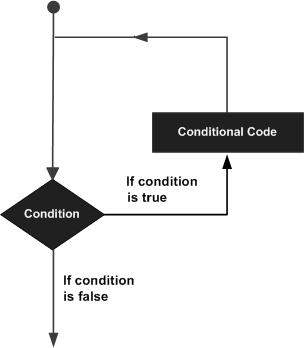
Loop Architecture
C++ programming language provides the following types of loop to handle looping requirements. Click the following links to check their detail.
Loop TypeDescription
Repeats a statement or group of statements while a given condition is true. It tests the condition before executing the loop body.
Execute a sequence of statements multiple times and abbreviates the code that manages the loop variable.
Like a while statement, except that it tests the condition at the end of the loop body
You can use one or more loop inside any another while, for or do..while loop.

Loop Control Statements

Loop control statements change execution from its normal sequence. When execution leaves a scope, all automatic objects that were created in that scope are destroyed.
C++ supports the following control statements. Click the following links to check their detail.
Control StatementDescription
Terminates the loop or switch statement and transfers execution to the statement immediately following the loop or switch.
Causes the loop to skip the remainder of its body and immediately retest its condition prior to reiterating.
Transfers control to the labeled statement. Though it is not advised to use goto statement in your program.

The Infinite Loop

A loop becomes infinite loop if a condition never becomes false. The for loop is traditionally used for this purpose. Since none of the three expressions that form the for loop are required, you can make an endless loop by leaving the conditional expression empty.
#include <iostream>
using namespace std;
 
int main () {

   for( ; ; ) {
      printf("This loop will run forever.\n");
   }

   return 0;
}
When the conditional expression is absent, it is assumed to be true. You may have an initialization and increment expression, but C++ programmers more commonly use the for(;;) construct to signify an infinite loop.
NOTE: You can terminate an infinite loop by pressing Ctrl + C keys.

Comments

Popular posts from this blog

In this chapter, we will see how to enable remote desktop application. It is important because this enables us to work remotely on the server. To do this, we have the following two options. For the first option, we have to follow the steps given below. Step 1  − Go to Start → right click “This PC” → Properties. Step 2  − On Left side click “Remote Setting”. Step 3  − Check radio button “Allow Remote connection to this computer” and Check box “Allow connection only from computers running Remote Desktop with Network Level Authentication (recommended)” → click “Select Users”. Step 4  − Click Add. Step 5  − Type user that you want to allow access. In my case, it is administrator → click OK. For the  second option , we need to follow the steps given below. Step 1  − Click on “Server Manage” → Local Server → click on “Enable” or Disable, if it is Disabled.
The Windows Firewall with Advanced Security is a firewall that runs on the Windows Server 2012 and is turned on by default. The Firewall settings within Windows Server 2012 are managed from within the  Windows Firewall Microsoft Management Console . To set Firewall settings perform the following steps − Step 1  − Click on the Server Manager from the task bar → Click the Tools menu and select Windows Firewall with Advanced Security. Step 2  − To see the current configuration settings by selecting  Windows Firewall Properties  from the MMC. This  allows access to modify the settings  for each of the three firewall profiles, which are –  Domain, Private and Public  and IPsec settings. Step 3  − Applying custom rules, which will include the following two steps − Select either  Inbound Rules  or  Outbound Rules  under  Windows Firewall with Advanced Security  on the left side of the management console...
The table creation command requires: Name of the table Names of fields Definitions for each field Syntax: Here is generic SQL syntax to create a MySQL table: CREATE TABLE table_name ( column_name column_type ); Now, we will create following table in  TUTORIALS  database. tutorials_tbl ( tutorial_id INT NOT NULL AUTO_INCREMENT , tutorial_title VARCHAR ( 100 ) NOT NULL , tutorial_author VARCHAR ( 40 ) NOT NULL , submission_date DATE , PRIMARY KEY ( tutorial_id ) ); Here few items need explanation: Field Attribute  NOT NULL  is being used because we do not want this field to be NULL. So if user will try to create a record with NULL value, then MySQL will raise an error. Field Attribute  AUTO_INCREMENT  tells MySQL to go ahead and add the next available number to the id field. Keyword  PRIMARY KEY  is used to define a column as primary key. You can use multiple columns separated by comma to define...