Normally, it is expected that the time period required for the 5G technology development and its implementation is about five years more from now (by 2020). But to becoming usable for the common people in developing countries, it could be even more.
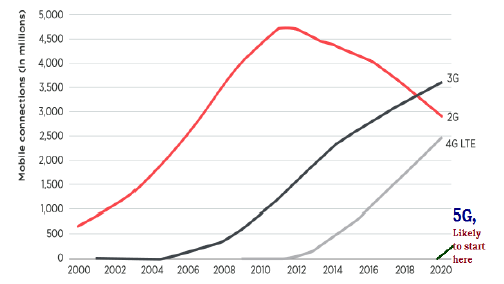
Time Period Required
Graph 1 − Showing the Timeline of all previous generation technologies.

Expected Time Length

By considering the multiple utility and various fashionable salient features, researchers are anticipating that this technology will be in use until 2040s.

Comments

Popular posts from this blog

Virtualization is one of the most important technology feature and Microsoft has invested on this and the responsible role is called as Hyper-V. Let us now see how to install the Hyper-V Role, for doing this we should follow the steps given below. Step 1  − To Install DNS role go to “Server Manager” → Manage → Add Roles and Features. Step 2  − Click Next. Step 3  − Select the  Role-based  or  feature-based installation  option → click Next. Step 4  − I will install a Local Hyper-V role as it will Select a server from the server pool → Next. Step 5  − From the Roles lists, check the Hyper-V Server role → click Add Features on the popup windows which show up and then → Next. Step 6  − Click Next. Step 7  − Choose your server’s physical network adapters that will take part in the virtualization → Next. Step 8  − Under  Migration , leave the default settings →  Next . Step 9  − Choose the...

HaydarOrac

Remote Management Service is one of the most important part pertaining to administration of Windows Server 2012. Administration of servers is performed through Windows Management Instrumentation. WMI instructions can be sent over network WinRM “Remote Management”. By default this utility is enabled, you can check it by going to Server Manager → then click on Local Server as shown in the following screenshot. If in case it is disabled, you can enable it by Opening PowerShell and then typing EnablePSRemoting as shown in the screenshot given below. There is another way to enable it – Click on “Server Manager” → Local Server, then ENABLE Remote management. Adding a Server for Remote Management To add other servers for remote management, follow the steps given below − Step 1  − Server Manager → Dashboard → Add other servers to manage. Step 2  − If the servers are joined to the domain, you add the select option “Active Directory“, in my case they are not joined, s...