Challenges are the inherent part of the new development; so, like all technologies, 5G has also big challenges to deal with. As we see past i.e. development of radio technology, we find very fast growth. Starting from 1G to 5G, the journey is merely of about 40 years old (Considering 1G in 1980s and 5G in 2020s). However, in this journey, the common challenges that we observed are lack of infrastructure, research methodology, and cost.

Still, there are dozens of countries using 2G and 3G technologies and don’t know even about 4G, in such a condition, the most significant questions in everyone’s mind are −
- How far will 5G be viable?
- Will it be the technology of some of the developed countries or developing countries will also get benefit of this?
To understand these questions, the challenges of 5G are categorized into the following two headings −
- Technological Challenges
- Common Challenges
Technological Challenges
- Inter-cell Interference − This is one of the major technological issues that need to be solved. There is variations in size of traditional macro cells and concurrent small cells that will lead to interference.
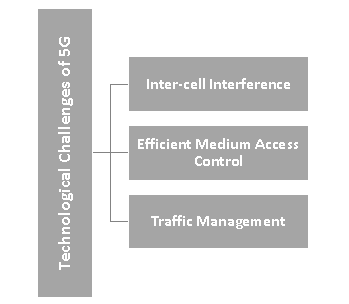
- Efficient Medium Access Control − In a situation, where dense deployment of access points and user terminals are required, the user throughput will be low, latency will be high, and hotspots will not be competent to cellular technology to provide high throughput. It needs to be researched properly to optimize the technology.
- Traffic Management − In comparison to the traditional human to human traffic in cellular networks, a great number of Machine to Machine (M2M) devices in a cell may cause serious system challenges i.e. radio access network (RAN) challenges, which will cause overload and congestion.
Common Challenges
- Multiple Services − Unlike other radio signal services, 5G would have a huge task to offer services to heterogeneous networks, technologies, and devices operating in different geographic regions. So, the challenge is of standardization to provide dynamic, universal, user-centric, and data-rich wireless services to fulfil the high expectation of people.
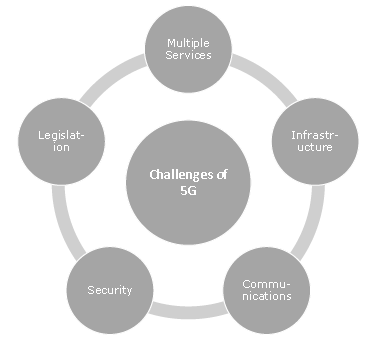
- Infrastructure − Researchers are facing technological challenges of standardization and application of 5G services.
- Communication, Navigation, & Sensing − These services largely depend upon the availability of radio spectrum, through which signals are transmitted. Though 5G technology has strong computational power to process the huge volume of data coming from different and distinct sources, but it needs larger infrastructure support.
- Security and Privacy − This is one of the most important challenges that 5G needs to ensure the protection of personal data. 5G will have to define the uncertainties related to security threats including trust, privacy, cybersecurity, which are growing across the globe.
- Legislation of Cyberlaw − Cybercrime and other fraud may also increase with the high speed and ubiquitous 5G technology. Therefore, legislation of the Cyberlaw is also an imperative issue, which largely is governmental and political (national as well as international issue) in nature.
Comments
Post a Comment