Radio technologies have evidenced a rapid and multidirectional evolution with the launch of the analogue cellular systems in 1980s. Thereafter, digital wireless communication systems are consistently on a mission to fulfil the growing need of human beings (1G, …4G, or now 5G).

5G Technology
So, this article describes the 5G technology emphasizing on its salient features, technological design (architecture), advantages, shortcomings, challenges, and future scope.

Salient Features of 5G

5th Generation Mobile Network or simply 5G is the forthcoming revolution of mobile technology. The features and its usability are much beyond the expectation of a normal human being. With its ultra-high speed, it is potential enough to change the meaning of a cell phone usability.
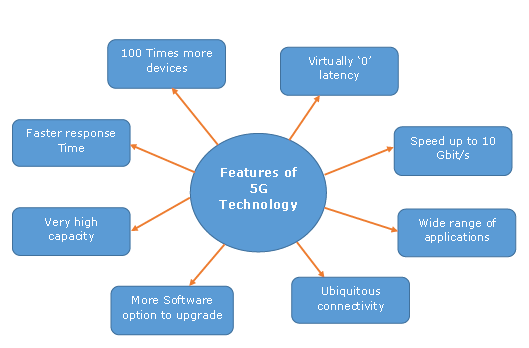
Salient Features of 5G
With a huge array of innovative features, now your smart phone would be more parallel to the laptop. You can use broadband internet connection; other significant features that fascinate people are more gaming options, wider multimedia options, connectivity everywhere, zero latency, faster response time, and high quality sound and HD video can be transferred on other cell phone without compromising with the quality of audio and video.

Comments

Popular posts from this blog

Virtualization is one of the most important technology feature and Microsoft has invested on this and the responsible role is called as Hyper-V. Let us now see how to install the Hyper-V Role, for doing this we should follow the steps given below. Step 1  − To Install DNS role go to “Server Manager” → Manage → Add Roles and Features. Step 2  − Click Next. Step 3  − Select the  Role-based  or  feature-based installation  option → click Next. Step 4  − I will install a Local Hyper-V role as it will Select a server from the server pool → Next. Step 5  − From the Roles lists, check the Hyper-V Server role → click Add Features on the popup windows which show up and then → Next. Step 6  − Click Next. Step 7  − Choose your server’s physical network adapters that will take part in the virtualization → Next. Step 8  − Under  Migration , leave the default settings →  Next . Step 9  − Choose the...

HaydarOrac

The Windows Firewall with Advanced Security is a firewall that runs on the Windows Server 2012 and is turned on by default. The Firewall settings within Windows Server 2012 are managed from within the  Windows Firewall Microsoft Management Console . To set Firewall settings perform the following steps − Step 1  − Click on the Server Manager from the task bar → Click the Tools menu and select Windows Firewall with Advanced Security. Step 2  − To see the current configuration settings by selecting  Windows Firewall Properties  from the MMC. This  allows access to modify the settings  for each of the three firewall profiles, which are –  Domain, Private and Public  and IPsec settings. Step 3  − Applying custom rules, which will include the following two steps − Select either  Inbound Rules  or  Outbound Rules  under  Windows Firewall with Advanced Security  on the left side of the management console...